Whats new in 1.2.1?
Now you can hide Like Box border, just uncheck ‘Show Border’ option on widget setting and vuala!
If you are using shortcode or template tag set ‘border‘ parameter to ‘false‘
Description
Simple Facebook Plugin enables Facebook Page owners to attract and gain Likes from their own WordPress blogs. The Like Box enables users to:
- See how many users already like this Page, and which of their friends like it too
- Read recent posts from the Page
- Like the Page with one click, without needing to visit the Page
Installation
- Upload ‘simple-facebook-plugin’ directory to your ‘/wp-content/plugins’ directory.
- Activate plugin in WordPress admin.
Usage
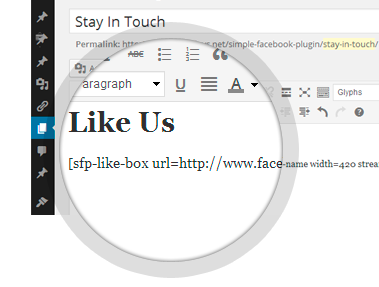
You can use it in three ways:
For more information visit WordPress Repo

cool, easy and simple to use well done for the good work
Having followed the installation and activation instructions faithfully, after all they are not complex, I can get a box to display on the blog, but it contains the message “There was an error fetching the like box for the specified page” What am I doing wrong?
Where the set-up asks for the Facebook website address I enter “http://www.facebook.com/Bimbling”
I think its because of you enter URL for your personal page. Like Box is only for Fan Pages like http://www.facebook.com/cocacola.
You can create your own Fan Page here http://www.facebook.com/pages/create.php
I use this shortcode –> [sfp-like-box url=http://www.facebook.com/myfanpage stream=true header=false faces=true], but nothing is displayed.. What am I missing?
I have tested this exactly shortcode and it’s working fine. You can create topic here and we will solve this problem.
I have a black background on my webpage……..the “light” color scheme is not quite light enough, how can I change the color of “1,042 like this” to more of a white color or much lighter grey? thank you for any help, DINO
Unfortunately there are only two color schemes that provided by facebook: light and dark. You can’t change the colors.
Nice plugin, but I can’t easily any of the CSS at all, that’s dumbbbb!
I’m afraid you cannot control the presentation of the Like Box, because it is an iframe. It’s a completely different HTML document, so your CSS rules will have no effect on it.
Changing CSS was possible with Facebook Fan Box (replaced with Like Box for over two years ago), so you can use this plugin that still use Fan Box.
Hi. Great plugin. Thanks for making it so easy. Just one small question.. Right now I have only 2 likes for my Facebook page. On my web site their faces are being displayed twice.. Any thoughts. I checked my FB page and they are just one time likes…
Thanks Tom..
Hi Tom, I think this problem is on the Facebook side. But I am sure that you will have a lot more likes on your page in nearest feature and that problem will disappear.
Hi
Having followed the installation and activation instructions faithfully, but the something isn’t working
That’s the URL from my fb page i put into “Facebook Page URL:”
http://www.facebook.com/pages/Junkz-SneakerBox/172190446183098
What else can be the problem?
I have tested widget with your URL and its working fine. Can you describe your problem in more details?
Hi, it is a great plugin. Can i just check is there anyany to default the background of the plugin to be white? Mine is place at the bottom of the page and the border is in Red so the plugin is all in red. Thanks
Hi, please add the line of code below to your theme css file (in most cases this is ‘style.css’)
.fb-like-box { background: #fff; }All super, easy to use. Only thing missing is Norwegian language.
Use this locale for Norwegian: nb_NO
awesome plugin!
Any chance to remove border?
Thanks
Hi!
You can remove border in new 1.2.1 version. Update plugin in admin or download from WordPress repo
When I am not logged into a facebook account, the plugin doesn’t show anything. Any help is appreciated
I believe this problem is on Facebook side, not plugin. Can you give me the address of your page? Maybe it will be clear for me when I see it.
Thanks.
Ok, we have figured this out. Here is the Why I can’t see my Like Box? post. Please take a look.Here is the Why I can’t see my Like Box? post. Please take a look.
how can i change the size of the faces to medium or small??
Hi! There is no way to change faces size.
the plugin works fine in chrome but doesnt seem to work in firefox?! any ideas why? it just doesnt display… heres the link below…
http://tenshirochester.com/tempsite/contact/
Hi! We will try to figure this out asap.
awesome that will be great how will we know when its sorted?
is also doesnt work on safari – both on os x 10.8.3
Hi, thanks for the widget. Im trying to stream a group and its posts by members (it is an open group.)Is this possible?
Hi, unfortunately you can’t do it with Like Box. It is working only with Facebook Pages and not Groups. More about the difference you can read here: Difference between a Facebook Page and Group
any progress on this?
Ok, we have figured this out. Here is the Why I can’t see my Like Box? post. Please take a look.
Love this plug in!